The natural successor to your REAPER scripts

Stop reaching for scripts.
Just describe what you need.

If you’ve been reaching for a different script every time you need to fix, edit, reshape, or create MIDI — this replaces all of them with a single instruction that actually understands your project. Describe a timing fix, a velocity curve, a complete stem, or an entire arrangement. It’s fully aware of your session — tracks, instruments, selected items, time selection, cursor, tempo — and puts the result exactly where it belongs.

Native REAPER plugin — Windows
Writes directly to your project — no copy-paste
No subscription — use your own AI key
3-day free trial — full Oracle features
Understands the music, not just the MIDI data

The generation demos aren’t a pitch for AI composition — we know REAPER users don’t want that — they’re here to prove how deeply MIDI Oracle understands music. That understanding is what makes every edit more accurate than any script.

Works inside REAPER. Understands the music, not just the data.

MIDI Oracle lives inside REAPER and operates your project directly — placing, editing, splicing, copying, and deleting MIDI in response to plain-language instructions, with full awareness of everything already in your project. No export, no copy-paste, no switching context. Every note lands as standard editable MIDI. Keep what works, change what doesn’t, or throw it away entirely.

1

Tell the Oracle what to do

The Oracle has full awareness of your project state — selected tracks, instruments, selected items, time selection, cursor position, markers, folder hierarchy, drum map, and the full tempo map — so you never have to explain it. Just say what needs to happen next.

"Fix the timing on these notes but keep the intentional early ones" "Humanize the velocities without losing the accents on the downbeats" "Correct any notes that are outside this instrument's range" "Add a variation to the second verse drum groove" "Rework this section but keep the original rhythmic feel" "Write a bass transition into the bridge"
2

It acts on your project directly

No copy-paste, no export, no browser tab. MIDI Oracle makes the change in REAPER — writing new material, editing existing notes, splicing sections, or restructuring what's there. If it needs to clarify something first, it asks you before touching anything.

3

Keep it, undo it, or push further

Hear the result, then decide. Hit Keep to commit, Undo to revert cleanly, or Refine to give the Oracle a follow-up instruction. It remembers everything said in the project — each round builds on the last.

Built by a musician. Started as a better script.

It started as a personal project to replace my own script folder — one to quantize, one to humanize, one for velocities, one to correct note ranges, one to change key… Each did one mechanical thing and none of them understood what the music was actually doing.

Under the hood MIDI Oracle uses AI, which is how it understands your music rather than just operating on the data. Once the plugin could handle any MIDI editing task I could throw at it, handling generated content from the AI was a natural consequence — something that emerged rather than something I designed. This presented me with a dilemma, since I have fairly strong views about AI replacing the work of genuine artists. My first instinct was to prevent it. However, early feedback from musicians who tested the product changed my mind. They pointed out genuinely creative uses — building a rough guide track for session players, rewriting a guitar piece for strings, hearing a chord idea before committing to it, and many others — and they made a great point that really put my mind at ease: REAPER users are musicians. The people who want AI to just write music for them without any musical knowledge aren’t editing MIDI in a DAW — they’re using online services that generate audio with little to no artistic input. REAPER users want to write their own music, they value their artistic integrity, and will wield this power responsibly.

In practice, most people use MIDI Oracle exactly as I do — 99% of the time as a replacement for scripts, and 1% when a project just needs a little extra to get moving.

Your script folder, retired.

Below is every category of MIDI operation that scripts have been written to solve — and what MIDI Oracle does with each. The last block covers what no script could ever do.

Timing & Quantization

  • Grid quantize
  • Iterative quantize
  • Swing timing
  • Humanize timing
  • Tighten loose performances
  • Nudge timing
Context-aware — corrects mistakes while preserving intentional pushes, pulls, and expressive timing.

Velocity & Dynamics

  • Humanize velocities
  • Scale velocities
  • Compress dynamics
  • Clamp min/max
  • Accent patterns
  • Normalize
Musical humanization — weights accents by beat position and phrase shape, not random offsets.

Note Length & Legato

  • Legato creation
  • Staccato shortening
  • Normalize lengths
  • Remove overlaps
  • Insert gaps
Articulation-aware — applies the right technique using your configured articulation layers automatically.

Logical & Conditional Editing

  • Filter by pitch, velocity, or position
  • Conditional transforms
  • Batch rule sets
  • Find & replace MIDI
Describe the condition in plain language. Save the instruction. Re-run it on any item without touching a line of code.

Drum Transforms

  • Flam creation
  • Ghost note generation
  • Accent patterns
  • Lane-specific humanization
  • Drum note remapping
Drum Oracle arranges musically — fills, transitions, and ghost notes placed in context, not blindly generated.

Pitch & Scale

  • Transpose
  • Scale quantize — snap to key
  • Chord generation
  • Arpeggiation
  • Invert · retrograde · mirror
Key and context aware — transposes with awareness of the project's harmonic material and neighbouring tracks.

Structural & Pattern

  • Duplicate patterns
  • Euclidean rhythms
  • Algorithmic generation
  • Step-sequencer transforms
Generates structure with musical logic — phrases, variation, and development rather than mechanical pattern distribution.

CC & Expression

  • Smooth CC curves
  • Randomize CC
  • Scale CC values
  • Expression shaping
  • Mod wheel editing
AI-driven CC and expression editing — coming in a future release.

Utility & Workflow

  • Batch transforms
  • Selection by rule
  • MIDI item cleanup
  • Remove overlaps
  • Fix note lengths
One instruction replaces a chain of scripts — describe the full operation once, save it, and run it any time.

And things no script can do.

Scripts operate on data. MIDI Oracle operates on music. These are the operations that require actual musical knowledge — the kind that can't be expressed in PPQ maths or conditional rules.

Arrange a piano part for full strings.

No script has musical knowledge. MIDI Oracle can rewrite a piano piece for strings, brass, or woodwind — adapting to each instrument's range, character, and idiomatic playing style while preserving the original feel.

Know the difference between a mistake and a choice.

A script quantizes everything. MIDI Oracle reads your performance, understands which late notes were expressive decisions, and corrects only the ones that weren't.

Write across tracks with musical understanding.

"Add a bass line that locks to the drum groove and follows the chord changes on the piano." No script operates across tracks with actual musical awareness.

Apply a style, not just a rule.

"Give this groove a jazz feel." "Make this string writing feel more like late Romantic orchestration." Scripts don't know genres, idioms, or composers.

Multiple operations. One instruction. Saved for later.

"Tighten the timing, humanize velocities with more weight on downbeats, fix out-of-range notes, smooth the legato transitions." Describe the full operation, save it as a named instruction, and share it with anyone — no opaque scripting logic, no run-order to remember.

Knows when to ask before acting.

When an instruction could reasonably go in more than one direction, MIDI Oracle pauses and asks. No script knows when it needs more context.

Every script you ever used was an attempt to put musical intent into code. MIDI Oracle lets you write the intent directly.

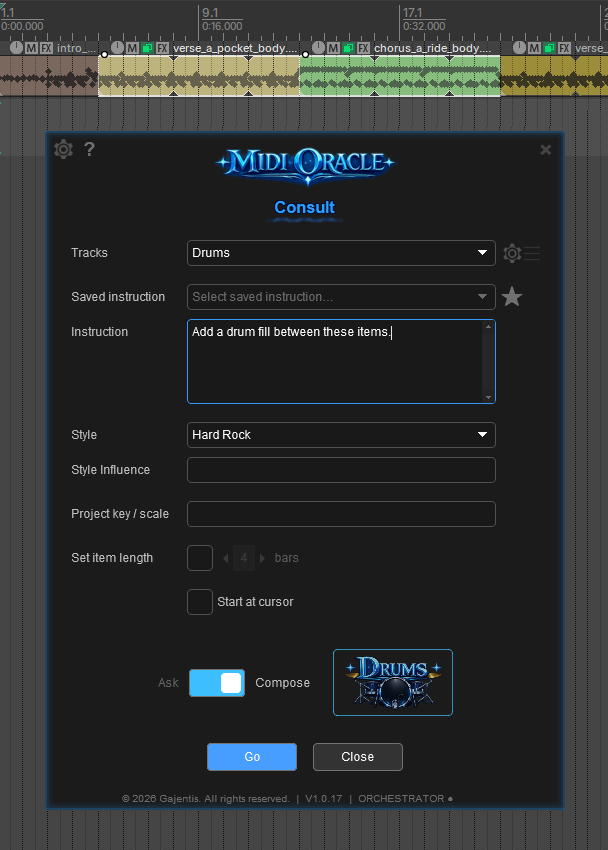
MIDI Oracle main interface — typing an instruction

Your project context is always known

MIDI Oracle is fully aware of your project — selected tracks, instruments, selected items, time selection, cursor position, markers, and the full tempo map. Tell it what you need in plain language and it acts on exactly the right parts.

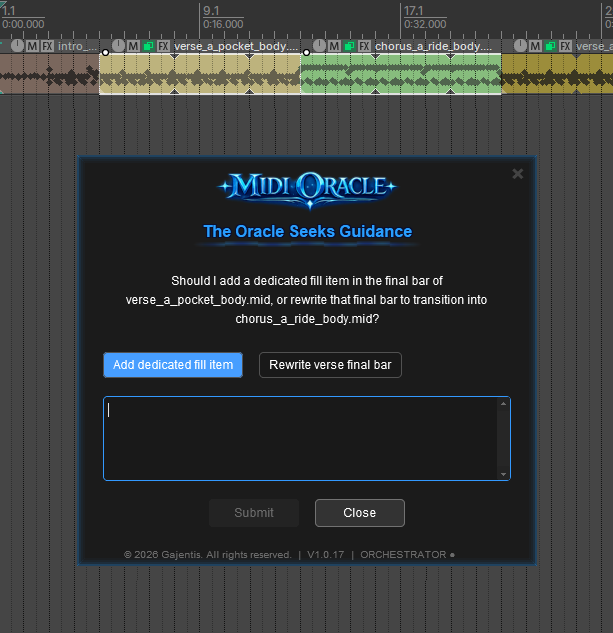
MIDI Oracle asking a clarifying question before acting

It asks when it needs to

When an instruction could reasonably go in more than one direction, MIDI Oracle pauses and asks — with multiple-choice answers or a free-text response. You answer, it acts. No guesswork, no wasted generations.

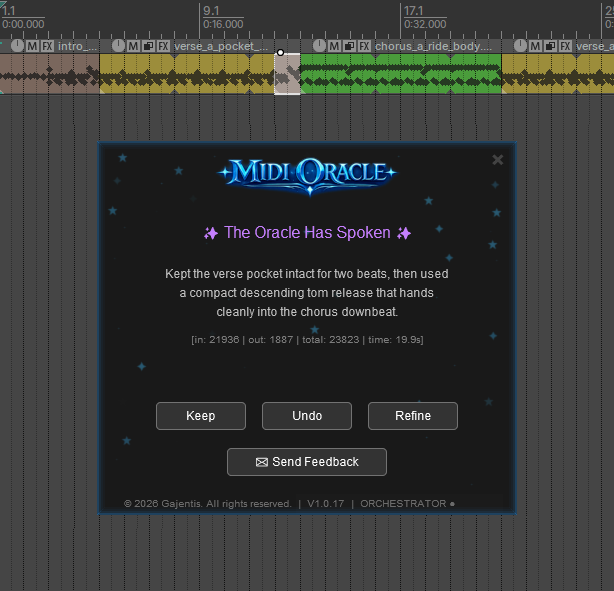
Generated MIDI appearing in REAPER timeline

Changes land directly in your timeline

No export. No clipboard. No context switch. MIDI Oracle writes new material, edits existing notes, and restructures sections directly inside REAPER — every result in the right place, at the right time.

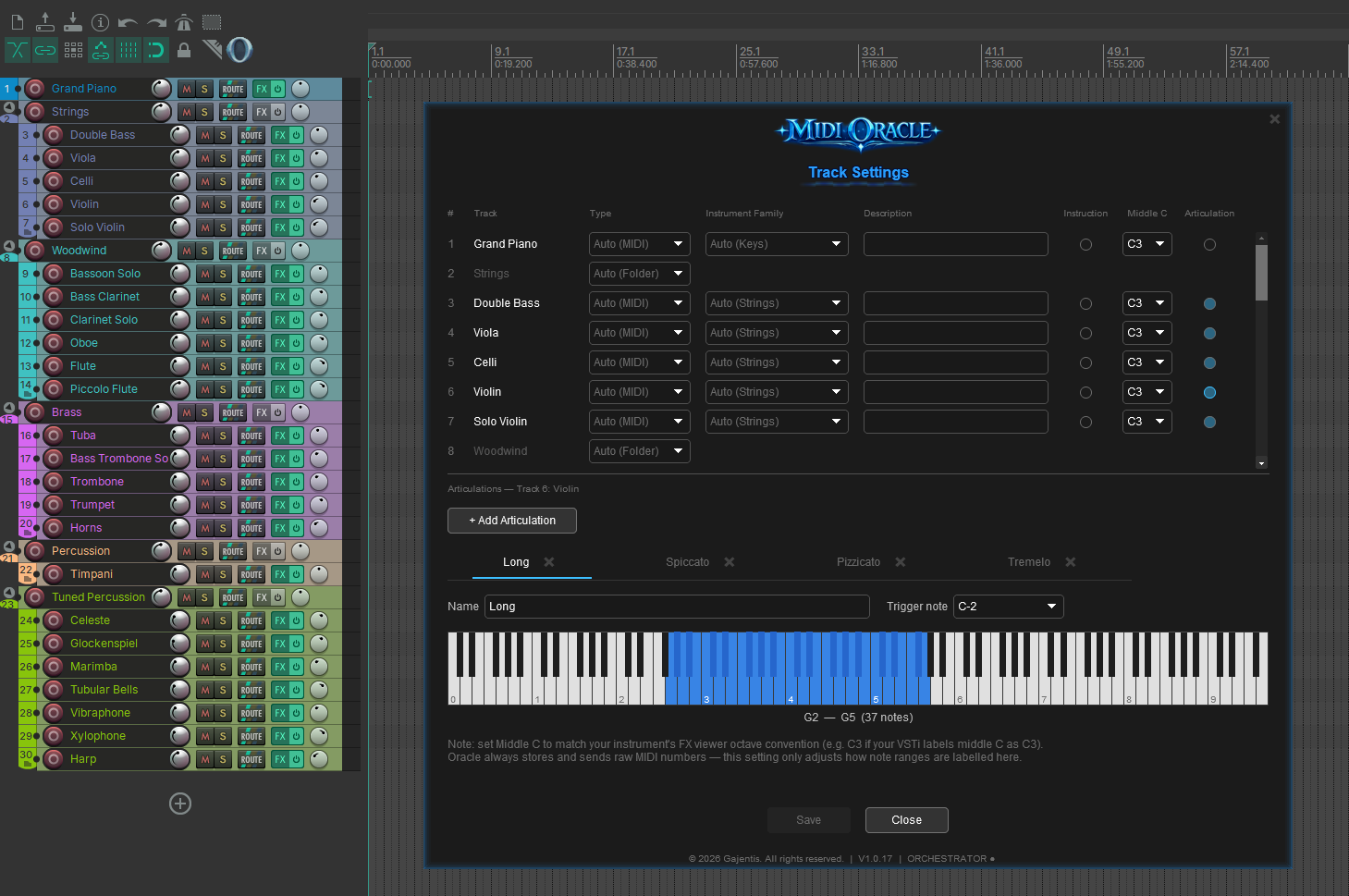
Per-track configuration panel showing note range and articulations

Every instrument, exactly configured

Define the physical note range, standing instructions, and full articulation map for every track — Legato, Spiccato, Pizzicato, Tremolo, and more, each mapped to its own keyswitch note. MIDI Oracle reads this before writing a single note, so the right articulation fires at the right moment and nothing ever plays outside the instrument’s range.

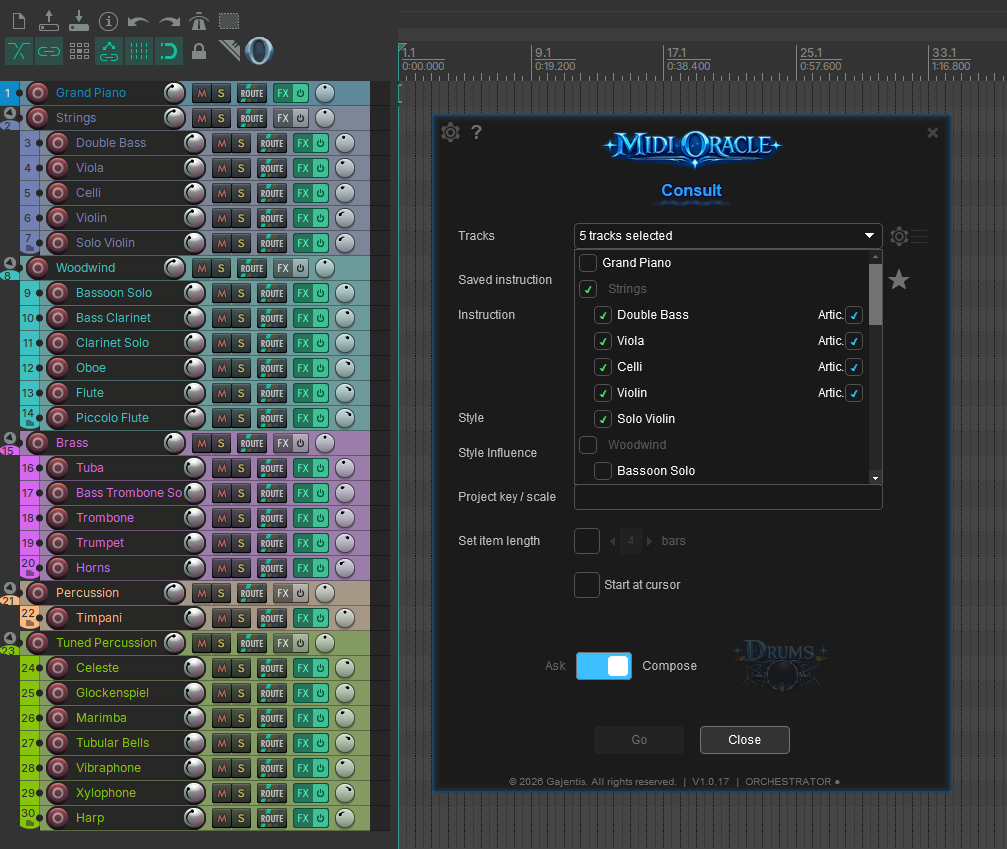
Include tracks dropdown showing a full orchestra with nested folders and articulations

Full visibility, even at 25 tracks

The track picker shows your entire project hierarchy — folder groups, nested instruments, and articulation layers — so you can include exactly the right parts in any generation. Nothing gets buried, even in a full orchestral template.

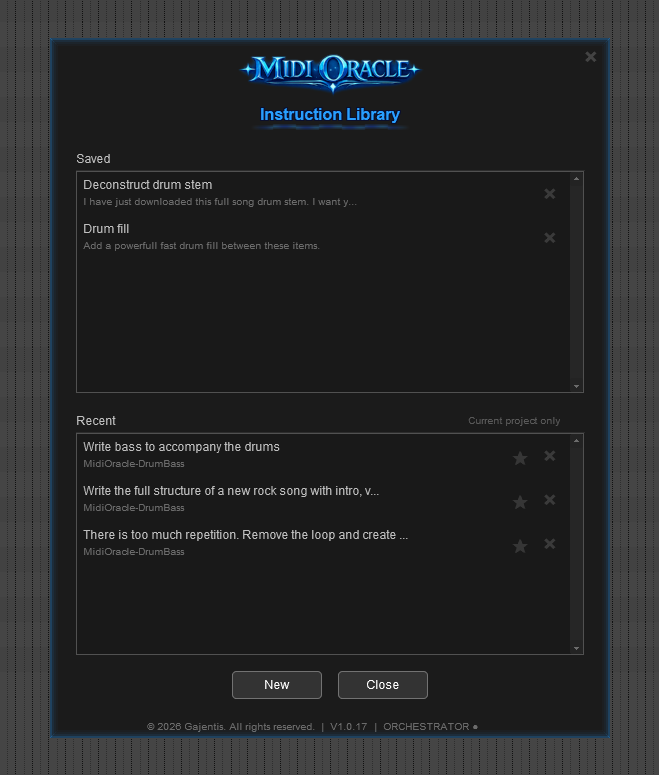
Instruction library and history

Every instruction you’ve sent stays in the project history — browse it, re-run it, or add it to your saved instructions for quick easy access in any session

Your MIDI workflow, in plain language

Fix a recording, reshape a performance, clean up a stem, or build something new — MIDI Oracle is fully aware of your project and acts on exactly the right parts.

It's always aware of your full project context

MIDI Oracle has full awareness of your project — selected tracks, instruments, selected items, time selection, cursor position, tempo map, drum map, and every note on every included track. You never have to tell it where to look.

"Fix the timing on these notes but keep the intentional early ones""Correct any out-of-range notes""Delete the section between the markers and tighten up the gap"
All editions

One instruction. Anything you can describe.

Fix timing, humanize velocities, correct note ranges, clean up overlaps, reshape a phrase, cut and replace a region — the same interface handles all of it. One instruction can replace a chain of scripts, and there is no separate mode for editing versus generating.

"Tighten the timing, weight the velocities toward the downbeats, and fix any out-of-range notes""Delete the fill in bar 12 and write a simpler one""Correct the range, smooth the note lengths into legato, remove overlaps"
All editions

Understands music, not just data

Scripts apply rules to MIDI bytes. MIDI Oracle understands what the music is actually doing — key, groove, phrase shape, and performance intent. That is why it can preserve intentional timing pushes while correcting mistakes, or accent downbeats rather than applying random velocity offsets.

"Fix the timing but keep the intentional pushes before the beat""Humanize the velocities but keep the downbeat accents stronger""Tighten this up without making it sound quantized"
All editions

Saved instructions — your script folder, reinvented

Build a library of named, plain-language instructions. Every entry is human-readable, editable without touching any code, and shareable with any collaborator. One click reruns any saved instruction on any item in any session.

"Humanize drums — stronger downbeats, natural ghost note falloff""String legato prep — fix range, remove overlaps, smooth note lengths"
OracleOrchestrator

Loop detection & pooled ghosts

Drop a MIDI stem in and ask MIDI Oracle to analyse it — it finds the loop points, identifies every repeated section, and restructures the whole thing as correctly-sized items with recurring sections linked as pooled ghost items. Edit the source and every copy updates instantly. When generating new content, MIDI Oracle creates the same structure natively.

"Analyse this drum stem and create pooled ghost items for all the repeated sections""Find the loop points in this bass MIDI and restructure it"
OracleOrchestrator

Asks before it acts. Remembers what you said.

When an instruction could go in more than one direction, MIDI Oracle pauses and asks — with multiple-choice options or free text. After any result, follow-up instructions refine what it did without repeating context. Every instruction in a session carries forward.

"Should the new part double the existing rhythm or contrast it?""Keep the rhythm but move everything up an octave""Do the same thing to the brass track"
All editions

Multi-track generation

Describe what you want and MIDI Oracle composes across multiple instrument tracks simultaneously — every part written in context of the others. Oracle supports up to 8 tracks; Orchestrator scales up to 36.

"Write a full orchestral intro — strings, brass, choir, and timpani""Compose a jazz trio — piano, upright bass, and brushed drums""Arrange this piano piece for string quartet"
OracleOrchestrator

Articulation-aware — from note range to keyswitch

Configure each instrument track once — its physical range and full articulation map. From that point, MIDI Oracle never writes a note outside the instrument's limits and switches articulations automatically, firing the correct keyswitch at the start of every passage — whether editing existing material or generating something new.

"Write a strings section using Long bowing in the intro, switching to Spiccato for the climax""Use Pizzicato for the bass throughout and Tremolo for the violins in the build"
Orchestrator only

Coming in a future release

These features are in active development. Each one requires new REAPER integration that goes beyond what instructions alone can do.

AI-Driven Markers & Regions

Ask the Oracle to analyse your project and mark it up — key changes, section boundaries, tension peaks, rhythmic landmarks. Navigate your session the way a human producer would label it.

"Create markers at every key change.""Add a region around each chorus.""Mark every dramatic peak in the strings.""Label the intro, verse, and bridge based on the arrangement."
Oracle only

AI-Driven Automation

Describe the shape and feel of a movement and the Oracle writes the automation for you — volume rides, filter sweeps, panning arcs — placed exactly where the music needs them.

"Create a volume fade-in over the first 4 bars.""Add a filter sweep on this synth through the chorus.""Automate the pan to follow the melody."
Oracle only

AI-Driven MIDI CC Generation

The Oracle adds expressive detail — mod wheel, vibrato, breath, expression — sculpted to the phrasing of your MIDI. The difference between mechanical and alive.

"Add realistic vibrato to this violin line.""Generate expression curves that match the phrasing.""Smooth out the mod wheel data."
Oracle only

Three editions. One lifetime licence.

Use your own AI key — no monthly fees, no usage caps from us. Orchestrator includes a 3-day free trial so you can try everything before you buy.

Launching Fall 2026

Register your interest and we'll notify you the moment MIDI Oracle is available. Everyone who registers before launch will receive a 10% discount code.

Muse
$19.99
Launch Price
Lifetime licence · 2 machines

  • Plain-language MIDI editing and generation
  • Reads your full project before every instruction
  • AI clarification — asks when an instruction is ambiguous
  • Refinement with follow-up instructions
  • Ask Mode — musical advice without making changes
  • Drum Oracle
  • Humanization controls
  • Bring your own AI key — OpenAI, Claude API or OpenRouter
  • Automatic updates
2 machine activations
Oracle
$39.99
Launch Price
Lifetime licence · 2 machines

  • Everything in Muse
  • Saved instruction library
  • Instruction history
  • Loop detection & pooled ghost items
  • Multi-track generation — up to 8 tracks
2 machine activations
Before you buy: MIDI Oracle requires an active account with an AI provider (OpenAI, Anthropic Claude, OpenRouter, or Azure OpenAI). This is not included in your licence — you will need to set up and fund your own API access separately. Purchasing without an AI provider account in place is not grounds for a refund. Licence Agreement →

One-time payment, no subscription. Introductory launch pricing — will increase after launch.

Get MIDI Oracle

A simple installer — run it, launch the plugin from REAPER, enter your licence key, and start consulting the Oracle.

Windows
Windows 10 / 11 · REAPER 7+
Licence key required to activate
No key yet? Try Oracle free for 3 days
macOS
REAPER 7+
Not yet available

MIDI Oracle for Mac is currently under consideration. Development will move forward based on user demand and feedback.

Need help getting started? Read the setup guide or visit the FAQ.

MIDI Oracle is new software and not yet digitally signed — Windows may show a SmartScreen warning. See the setup guide for how to proceed.

A few things worth knowing

MIDI Oracle isn't trying to replace you — it's built to handle the parts of MIDI production that slow you down so you can stay focused on the music.

No empty piano roll staring back at you.

Describe what you need and something lands on the timeline. It won't be perfect first time — that's what Refine is for.

You pay OpenAI directly. Not us.

Connect your own API key and every token goes straight to your provider. No hidden markup, no usage cap, no subscription on top of a subscription.

Native REAPER plugin. No browser tab.

MIDI Oracle installs as a REAPER plugin. It opens in a panel, reads your project in full, and writes back to it directly. Nothing leaves your session.

The result is yours to change.

Every generated item lands in your project as standard MIDI. Edit it, rework it, or throw it away — it's a starting point, not a commitment.

Follow-up instructions just work.

Give it a follow-up and it adjusts — keeping what worked and changing what didn't. The full instruction history for the project carries forward every time.

One instruction. Not six scripts.

Quantize, humanize, fix velocities, correct range — whatever a dedicated script used to handle mechanically, MIDI Oracle handles contextually. One tool that understands the music, not just the data.

Common questions

Can't find your answer? Email us at info@midioracle.com

That concern deserves an honest answer rather than a dismissal.

MIDI Oracle started as a personal project to replace a folder full of scripts — a quantize script, a humanizer, a velocity editor. Not to replace a composer. The goal was one context-aware tool that could handle any of those operations with a single instruction, because the scripts each did one mechanical thing and none of them understood the music.

The ability to generate music from scratch evolved from the same foundation. Both capabilities are real, and both are there to use however you see fit. At one end it cleans up your recordings, fixes MIDI you’ve already written, and handles the workflow tasks that used to need a different script each time. At the other end you can hand it a brief and generate a full arrangement from scratch. Most people work somewhere in between.

Where you place yourself on that spectrum is entirely your choice. The tool is as creative or as mechanical as you make it.

Context. A quantize script snaps everything to the grid — all of it, the same way, regardless of what the music is doing. MIDI Oracle can read that some of those late notes were intentional, understand what section of the arrangement you’re in, and apply the operation in a way that fits the music rather than just the data.

The same is true for humanization, velocity editing, transposition, key correction, range fixing, or anything else a dedicated script handles mechanically. You get the same operations — with one instruction instead of six dialogs, and results that reflect what the music actually needs.

This is genuinely how MIDI Oracle started: as a replacement for a collection of single-purpose scripts that each did one thing with no awareness of the context. Generation came later, as a natural extension of having a tool that understood the project.

MIDI Oracle requires REAPER 6.0 or later. It has been tested on REAPER 6.x and REAPER 7.x on Windows 10 and Windows 11. Other operating systems are not supported.

Yes. MIDI Oracle uses your own AI provider API key — Muse supports OpenAI, the Claude API (Anthropic), and OpenRouter. Orchestrator adds Azure OpenAI and Claude CLI on top of that. You pay the provider directly at their standard API rates. There is no separate MIDI Oracle subscription or usage fee.

After 3 days the trial expires and the plugin will stop generating. Any MIDI you already generated and placed on your REAPER timeline remains fully usable. You can purchase a Muse or Oracle licence at any time to reactivate.

Both Muse and Oracle licences allow 2 simultaneous machine activations — ideal for a desktop and laptop setup. The 3-day Oracle trial also activates on up to 2 machines. If you need to transfer an activation to a new machine, you can deactivate remotely from your account portal.

Yes. Muse users can upgrade to Oracle at any time. Contact us at info@midioracle.com with your licence key and we'll issue an upgrade price that credits what you've already paid.

Your API key is stored locally on your machine using the operating system's secure credential store — it is never transmitted to Gajentis servers or stored in plain text. API calls go directly from the plugin on your machine to your chosen AI provider's servers, so we never see or log your key.

Yes. Muse supports OpenAI, the Claude API (Anthropic), and OpenRouter. Orchestrator adds Azure OpenAI and Claude CLI on top of that. Simply select your provider and enter your API key in the plugin settings. OpenRouter is particularly useful if you want access to multiple model families through a single account without signing up to each AI provider individually.

Yes — this is one of the things MIDI Oracle does particularly well. Before generating, it reads your existing MIDI items on neighbouring tracks so it understands what’s already happening harmonically and rhythmically. You can ask it to “write a bass line that follows the chord progression on the keys track” or “add a counter-melody that sits under the lead” and it will reason about your existing material rather than generating in isolation. Oracle supports up to 8 tracks simultaneously; Orchestrator scales up to 36, so the whole arrangement stays coherent.

MIDI Oracle uses your REAPER time selection or edit cursor position to determine exactly where to place generated content — so it always lands where you intend. Tempo envelopes are also read, so generated content is always rhythmically correct even across tempo changes. Orchestrator users get additional context awareness: MIDI Oracle reads your project’s markers and regions, which means you can ask for something like “write a breakdown for the Bridge region” and it will work within those boundaries automatically.

Yes. Each track has its own configuration panel where you can write persistent instructions that are automatically included whenever MIDI Oracle works on that track. You might tell the bass track to always stay in the low register and avoid the root on beat one, tell the strings track to favour long sustained voicings, or remind the piano track it's playing jazz comping. These instructions stay with the track across sessions, so you build up a per-instrument personality over time without having to re-explain it with every instruction.

You can also define articulations for each track — named note range layers that tell the Oracle which keys the instrument can actually play for a given voicing or articulation. If your kontakt library has a "Legato" layer on C2–B3 and a "Staccato" layer on C4–B5, you can set both up as articulations, each with its own name, playable note range, and optional keyswitch trigger note. The Oracle reads all of this before generating, so it stays within the correct range and inserts the right keyswitch automatically.

Completely. Every generation is a standard REAPER undo step, so Ctrl+Z works exactly as you'd expect. MIDI Oracle doesn't modify your project in any hidden way — it simply places MIDI items on your timeline like any other action. You can also ask MIDI Oracle to refine or replace a section with a follow-up instruction rather than undoing entirely; the conversation context is preserved so it understands what it wrote previously and what you'd like changed.

Musicians are creative artists — most have no interest in handing their compositions to an AI, and MIDI Oracle is built with that in mind. It's a workflow accelerator: think of needing to repeat a multi-track section transposed up a fifth, shifted into a new key, or with subtle rhythmic or melodic variation across every part. Instead of reworking each track manually, MIDI Oracle processes them all in one go. The music is still entirely yours — your harmonic language, your feel, your decisions — just arrived at faster and with a richer pool of ideas to draw from. If you want it to generate larger sections or full arrangements from scratch, it can do that too; the scope is always your call.

Drum Oracle can generate drums from scratch, but it's been designed to work best when existing drum items are already present — whether written by you or imported from a library. It reads that context and builds around it, which tends to produce far more musical results.